
WorkBooks
Turn any smartphone into a digital science lab anytime anywhere!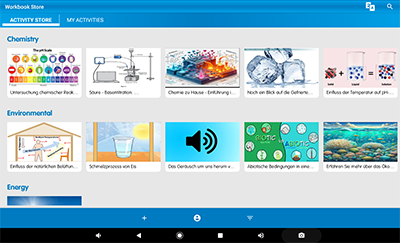
The Workbooks sub-app is part of the MiLABEx software and can be facilitated in 2 ways-
1. Teachers can easily create a specific activity for their students with everything needed to run an experiment, including the experiment setup parameters and an explanatory video and PDF, and share it with an unlimited number of students and groups.The students can start the experiment immediately, saving precious setup time.
2. Download over 350 predefined Workbooks, divided by curriculum topic, connect the relevant sensor, and start the experiment. The Workbooks content library provides a wide range of experiment ideas for teachers and students, enabling hands-on science experiments everywhere—at home, in the classroom, or outside.
New feature! AI Translation Tool
The new AI Translation Tool is embedded in the MiLABEx Workbooks and assists educators and students to seamlessly translate over 350 interactive workbooks to your local language at the click of a button, ensuring every student can learn science in their own language.
Watch the video to see the AI feature in action-
Get to know the WorkBook sub-app
Browse Activity Store Workbooks-
Open the MiLABex software, and click on the WorkBooks sub-app. The first screen is the Activity Store, with uploaded activities in different subjects.
Teachers can open and download each activity to their tablet, read the explanatory PDF, watch the video and perform the experiment in class or as an outdoor activity.
The explanatory PDF explains which sensors are needed and how to perform the experiment.
Watch the tutorial video below-
Create customized activities and share them with students
The WorkBook sup app allows teachers and educators to create a customized workbook-
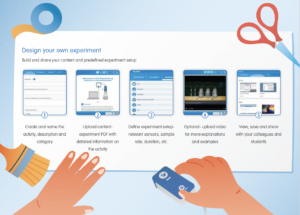
1. Create and name the activity, description, and category.
2. Upload content- experiment PDF with detailed information on the activity
3. Define experiment setup- relevant sensors, sample rate, duration, etc.
4. Optional- upload a video for more explanation and examples of the experiment.
5. View, save, and share with your colleagues and students.
Teach Science!
WorkBook features
- Simple workbook/experiment creation
- Quick experiment sharing with unlimited students
- Workbooks include the experiment setup, turning setup time to learning time
- Students can get the Workbooks from anywhere
- Offline work method on the Workbooks is available in the MiLABEx software
- Online connection is needed only for downloading and uploading of the Workbooks
- Built in AI Translation Tool for local adaptations to your preferred language
 ALBERT EINSTEIN and/or EINSTEIN are trademarks or registered trademarks of The Hebrew University of Jerusalem, represented exclusively by CMG, and are used with permission.
Official licensed merchandise. All rights reserved.
ALBERT EINSTEIN and/or EINSTEIN are trademarks or registered trademarks of The Hebrew University of Jerusalem, represented exclusively by CMG, and are used with permission.
Official licensed merchandise. All rights reserved.
